

A few months back, I woke up to a notification on my phone at 2 AM. My neobank had flagged a transaction attempt — someone trying to move money out of my account from a location I’d never been to. The attempt was blocked automatically. I didn’t lose a single rupee.
That moment genuinely changed how I think about digital banking security. Because here’s the thing — I hadn’t done anything special. I hadn’t set up some complex manual alert. The neobank’s security layer caught it on its own, while I was asleep.
Traditional banks talk about security a lot. But the actual experience of having a neobank’s protection work in real time, invisibly, in the middle of the night? That’s a different thing entirely.
So let me walk you through the seven security features that actually make a difference — based on what I’ve used, tested, and occasionally learned from the hard way.
1. Biometric Authentication — Your Face and Fingerprint Are Now Your Password

Passwords are honestly a mess. We reuse them, we forget them, we make them too simple because we have seventeen accounts to manage. Neobanks figured this out early and moved hard toward biometric authentication.
Most serious neobanks today use fingerprint scanning and facial recognition as the primary login method. But what surprised me is how much more sophisticated this has gotten recently.
It’s not just “does this face match the stored photo.” Modern biometric systems use liveness detection — meaning they can tell the difference between a real person holding up their phone and someone holding up a printed photo or even a video of someone else’s face. I tested this once out of curiosity by holding my phone up to a photo of myself. Rejected immediately.
How it actually works in practice:
- You set up biometrics during account creation
- Every login requires a live biometric check
- Some neobanks also require biometric confirmation for high-value transactions
- If biometric fails repeatedly, the account locks and recovery goes through a separate secure channel
The step-up authentication is what I find most valuable. My neobank doesn’t just ask for my fingerprint to log in — it asks again when I try to send above a certain amount. That second checkpoint has saved more than a few accidental transfers too, honestly.
Mistake people make: Skipping biometric setup because it “feels like extra steps” and defaulting to a simple PIN. That PIN is dramatically weaker. Take the two minutes to set up biometrics properly.
2. End-to-End Encryption — What It Actually Means for Your Money
Encryption gets thrown around a lot as a buzzword, but let me explain what it actually means in a way that makes it useful to know.
When you make a transaction on a neobank app, the data doesn’t travel as readable information. It gets scrambled into something unreadable at your end, travels across the internet in that scrambled form, and only gets unscrambled at the bank’s secure server. Even if someone intercepts it in the middle — which is genuinely possible on public WiFi — they get nothing useful.
End-to-end encryption (E2EE) means this scrambling covers the entire journey, not just part of it.
Here’s where it gets practically relevant: I once made a transfer while connected to a coffee shop’s public WiFi. Not my smartest move. But the transaction was fine because the encryption meant the open network was irrelevant to the security of my data.
| Encryption Type | What It Protects | Who Can Read Data |
|---|---|---|
| Basic SSL/TLS | Data in transit | Bank servers + sometimes intermediaries |
| End-to-End Encryption | Full journey | Only sender and recipient bank |
| Zero-Knowledge Encryption | Even stored data | Only the user |
Most top-tier neobanks operate at the E2EE level at minimum. Some are moving toward zero-knowledge architectures for sensitive data storage — meaning even the bank’s own staff can’t read certain data without your key.
Practical tip: Check if your neobank’s app forces HTTPS connections and shows certificate details. If an app ever loads on plain HTTP, close it and contact support immediately.
For users who want to understand how encryption fits into the broader audit picture, 5 Powerful Neobank Digital Wallet Security Audits Secrets Banks Hide covers some of the internal mechanisms banks use that most customers never see.
3. Real-Time Fraud Detection — The Feature That Woke Me Up at 2 AM
This is the one that saved me, so I have a lot of feelings about it.
Real-time fraud detection is essentially a behavioral AI running constantly in the background of your account. It learns your normal patterns — where you usually transact, what amounts you typically move, what time of day you’re active, which devices you use — and then flags anything that breaks that pattern.
The system that caught my unauthorized transaction was doing something fairly sophisticated. It noticed that:
- The login came from an unrecognized device
- The location was geographically inconsistent with my recent activity
- The transaction amount was larger than my typical transfers
- The time was outside my normal activity window
Any one of those alone might not trigger a flag. All four together? Blocked instantly, notification sent to me, attempted action logged.
How neobanks build these systems:
Step 1 — Baseline building: The system spends your first few weeks of usage learning your patterns quietly.
Step 2 — Anomaly scoring: Every transaction gets a risk score based on how far it deviates from your baseline.
Step 3 — Threshold response: Low-risk anomalies might just get logged. Medium-risk might trigger a push notification asking you to confirm. High-risk gets blocked and escalated.
Step 4 — Feedback loop: When you confirm or deny that a flagged transaction was yours, the system updates its model for your account.
Some neobanks let you see your own anomaly flags in the app — that transparency is actually quite useful. You can understand why something got flagged and adjust accordingly.
Unexpected lesson I learned: The system flagged me once when I made a large payment to a new recipient while traveling. Completely legitimate transaction. I had to confirm it through the app before it went through. Mildly annoying — but I’d take that over the alternative every single time.
4. Instant Card Freeze and Virtual Card Controls
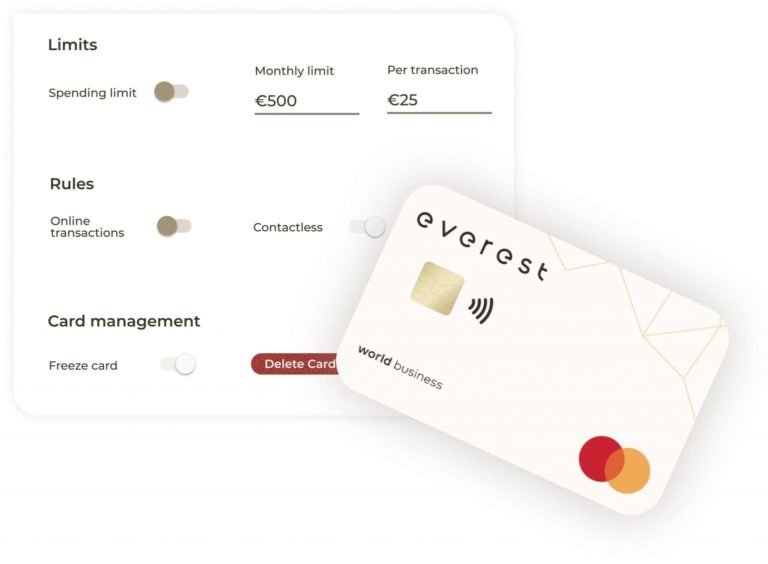
This feature sounds simple, but the implications are significant once you actually use it.
Traditional bank: If your card gets compromised, you call a helpline, wait on hold, speak to someone, and maybe get a replacement card in five to seven business days. Your card is live and potentially being used by someone else the entire time.
Neobank: You tap “freeze card” in the app. Card is inactive in under three seconds. Tap “unfreeze” when you find your wallet under the couch cushion. Done.
I’ve used the freeze feature three times — twice when I genuinely couldn’t find my card, once when I noticed an unfamiliar charge and wanted to stop any further activity while I investigated. In all three cases, the response was instant.
But the more interesting feature is virtual cards. Many neobanks now let you generate disposable virtual card numbers for online purchases. Here’s the workflow:
Step 1: Open your neobank app and navigate to virtual cards.
Step 2: Generate a new virtual card number — it has its own 16-digit number, expiry, and CVV, but links to your main account balance.
Step 3: Use this number for your online purchase.
Step 4: After the purchase, you can delete that virtual card number or set it to expire automatically.
Step 5: Even if that merchant’s database gets breached, the card number is already dead — your real account is untouched.
I use this religiously for any website I don’t completely trust or haven’t used before. It’s added maybe 30 seconds to my checkout process and completely eliminated my anxiety about online shopping on smaller sites.
5. Multi-Factor Authentication Done Right
MFA isn’t new. But neobanks have implemented it significantly better than most traditional banks — and the difference matters.
Bad MFA: An SMS code sent to your phone number. SMS-based authentication has a known vulnerability called SIM swapping, where a fraudster convinces your mobile carrier to transfer your number to their SIM. Once they have your number, they receive your OTPs.
Better MFA: App-based authenticators like Google Authenticator or Authy, where codes are generated locally on your device rather than sent over a network. These can’t be intercepted the same way.
Best MFA: Biometric + authenticator app + behavioral verification happening simultaneously. Some neobanks are at this level now.
What I’ve noticed with better-designed neobanks is that MFA feels less intrusive because it’s context-aware. Logging in from my usual phone, usual location, during my usual hours? Sometimes it doesn’t even ask for a second factor beyond biometrics. Logging in from a new device or location? It stacks multiple verification layers immediately.
That context-awareness is the difference between security that protects you and security that just annoys you until you find workarounds.
8 Quick Neobank Digital Wallet Security Audits to Perform Today has a useful checklist for verifying whether your current MFA setup is actually as strong as you think it is — worth going through if you haven’t recently.
Common mistake: Using the same phone number for MFA that’s publicly associated with you online. If your number appears on LinkedIn, social media, or data broker sites, SIM swap risk goes up considerably. Consider using a separate, private number for banking MFA.
6. Secure API Architecture — The Invisible Layer Most Users Never Think About
Here’s one that most people don’t think about at all — but it affects your security constantly.
Neobanks are built on APIs (Application Programming Interfaces) — essentially the connection points between different software systems. Your app talks to the bank’s servers through APIs. If those APIs aren’t secured properly, they become entry points for attackers.
Poorly secured APIs have been behind some of the biggest fintech data breaches. An attacker doesn’t need to break into the bank’s main vault if there’s a poorly locked side door.
What good API security looks like at a neobank:
- Token-based authentication: Every API request requires a secure token that expires quickly, so intercepted tokens become useless fast.
- Rate limiting: APIs reject requests that come too frequently — blocking automated attack scripts that try thousands of combinations rapidly.
- Input validation: APIs check every piece of data they receive to ensure it’s legitimate — preventing injection attacks where malicious code is smuggled in as data.
- Encryption in transit: All API communications are encrypted (this ties back to E2EE).
You can’t directly see whether a neobank’s APIs are secured — but you can look at indirect signals. Have they had public API-related breaches? Do they publish security audit reports? Do they participate in responsible disclosure programs (where security researchers report bugs to them privately)?
Neobanks that run bug bounty programs — paying ethical hackers to find and report vulnerabilities — tend to have significantly tighter API security because they’re getting it stress-tested constantly.
Real-world example: A well-known fintech had a publicly disclosed API vulnerability a few years ago where user account data was accessible simply by changing a number in the URL. No hacking skill required. Proper API security with access control would have made that impossible.
7. Behavioral Biometrics — Security That Watches How You Type, Not Just Who You Are
This one genuinely surprised me when I first learned about it. It sounds slightly unsettling until you understand what it’s actually doing.
Behavioral biometrics analyzes how you interact with your device — not just who you are. Things like:
- The rhythm and speed of your typing
- How you hold your phone (gyroscope data)
- The pressure and angle of your touchscreen taps
- How quickly you navigate between screens
- Your typical scrolling patterns
Every person has a surprisingly unique behavioral fingerprint when using a phone. And unlike passwords or even regular biometrics, this can’t be easily stolen or replicated.
The practical implementation: While you’re using your neobank app normally, a background system is continuously comparing your behavior to your baseline profile. If something feels off — even if the login succeeded — the system can step up authentication or flag the session for review.
This matters because it protects against account takeover scenarios where someone has legitimately obtained your credentials (through phishing, for example) and logged in successfully. They passed the password check. They might have passed MFA somehow. But they can’t fake being you in how they use the app.
| Security Feature | What It Checks | When It Activates |
|---|---|---|
| Password/PIN | Knowledge | Login |
| Biometrics | Physical identity | Login + transactions |
| Device fingerprinting | Hardware | Login from new device |
| Behavioral biometrics | Interaction patterns | Continuous/always-on |
| Transaction monitoring | Financial patterns | Every transaction |
The combination of all of these layers is what makes a well-designed neobank account genuinely difficult to compromise — even if one layer gets bypassed.
Some neobanks are more transparent about this than others. If you check your neobank’s privacy policy and see references to “behavioral analytics” or “device telemetry” — that’s usually what they’re talking about.
Mistakes That Undermine All of This Security
None of these features work well if you undermine them yourself. The most common ways people accidentally create vulnerabilities in otherwise secure accounts:
Using weak recovery options. Your security questions — if your neobank still uses them — are often the weakest link. “Mother’s maiden name” is public information for plenty of people. Use nonsense answers and store them in a password manager.
Ignoring app updates. Security patches often come through regular app updates. If you’ve been ignoring that “update available” notification for three weeks, you might be missing a fix for a known vulnerability.
Disabling notifications to reduce “noise.” Push notifications for transactions are a core security feature. When you turn them off because they’re annoying, you lose your real-time awareness of account activity. Customize them instead of killing them.
Using public WiFi without a VPN for banking. Even with encryption, some environments are riskier than others. A VPN adds an additional layer when you’re on a network you don’t control.
For anyone who wants to go deeper on performing their own security checks around these features, 9 Key Neobank Digital Wallet Security Checkpoints walks through a structured verification process you can do yourself.
A Quick Comparison: How Security Features Stack Up Across Account Types
| Security Feature | Basic Neobank | Premium Neobank | Traditional Bank |
|---|---|---|---|
| Biometric Auth | Standard | Advanced + liveness | Varies |
| Real-Time Fraud Detection | Basic rules | AI-powered | Usually batch |
| Virtual Cards | Sometimes | Usually yes | Rarely |
| Instant Card Freeze | Yes | Yes | Getting there |
| Behavioral Biometrics | Rare | Increasingly common | Very rare |
| MFA Options | SMS or app | App + biometric | Mostly SMS |
| API Security Transparency | Low | Moderate | Low |
Wrapping Up
That 2 AM notification changed something for me. It made security feel real rather than theoretical. Because I’d read about fraud detection systems before — but experiencing one catch an actual threat to my account while I slept made it concrete.
The seven features I’ve covered here aren’t theoretical either. They’re running right now, in the background, on any well-built neobank platform. The question worth asking is: does your neobank have all of them?
If you’re not sure, start by checking whether your neobank offers virtual cards, whether MFA uses an authenticator app rather than just SMS, and whether you’re getting real-time transaction notifications. Those three checks alone will tell you a lot about how seriously they’re taking your account security.
And if you want to get more systematic about it, 12 Neobank Digital Wallet Security Audits Dozens Are Ignoring covers several additional audit steps that go beyond the basics — including some that most users never think to check.
Your account security is partly the neobank’s job. But knowing what to look for puts some of that control back in your hands.